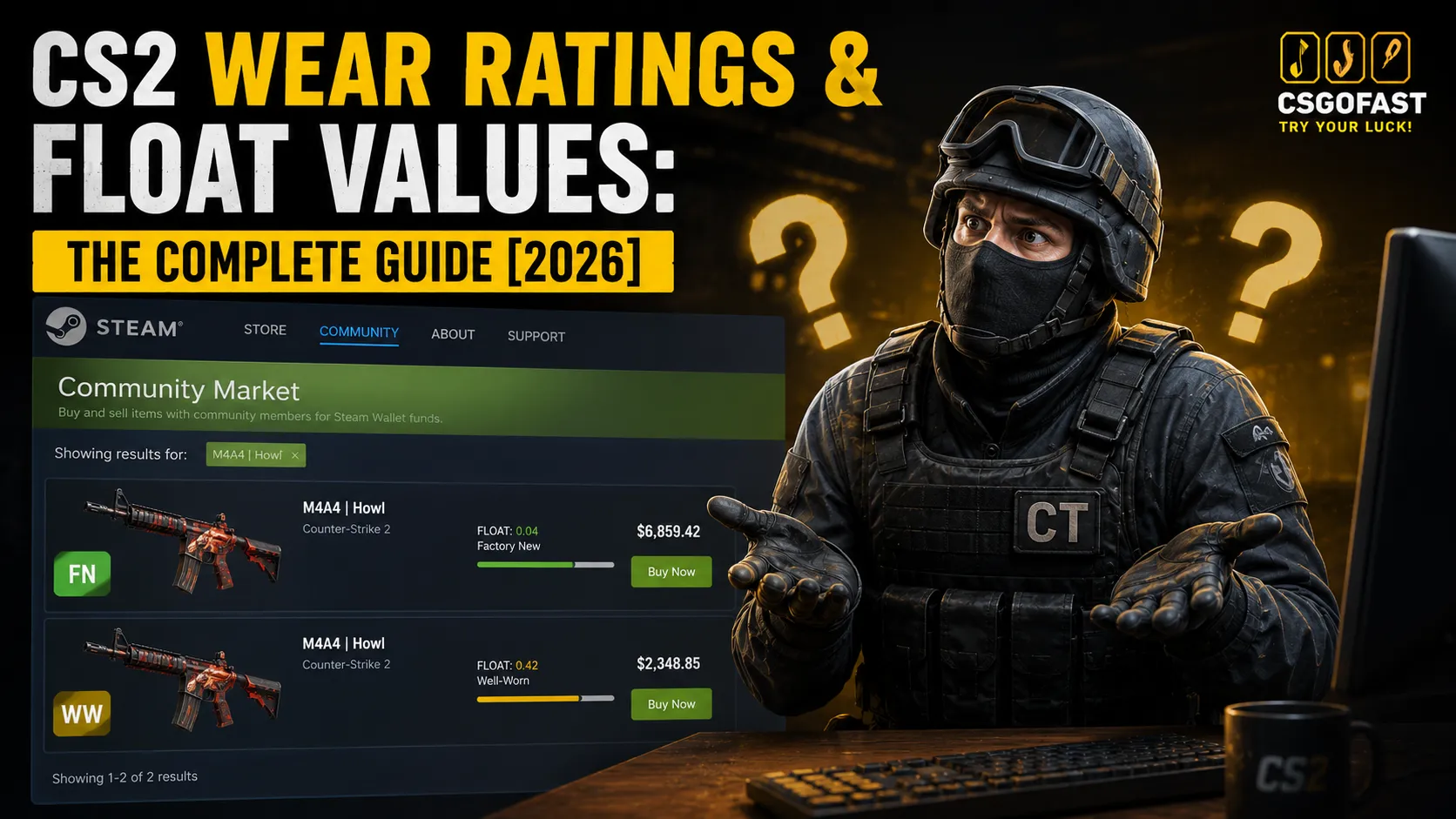
Same skin, same wear tier on the label – but a $700 price gap. Sound familiar? Or better yet: a seller swears the skin “wore down a bit from matches” and that’s why it’s cheaper now. Makes sense, right? Spoiler: that’s complete nonsense, and not knowing this costs players real money every single day.
In Counter-Strike 2 (CS2), every skin’s appearance comes down to one small number – float value. It runs from 0.00 to 1.00, gets locked in the moment the item is created, and never changes. That number determines whether a skin lands in Factory New or Battle-Scarred condition, whether it looks fresh off the shelf or like it got dragged through a warzone – and ultimately, what it’s worth.
In this guide, we’ll break down everything: how the 5 wear levels work, what’s actually hiding behind the “Field-Tested” label, why two skins in the same tier can be priced worlds apart, how to check float before you buy, and how to use all of this in trade-up contracts. By the end, you’ll understand the system better than most players with hundreds of hours on the clock.
Key Takeaways
- Float value is a number from 0.00 to 1.00, permanently locked in the moment a skin drops or gets unboxed
- There are 5 wear levels: Factory New, Minimal Wear, Field-Tested, Well-Worn, and Battle-Scarred
- Playing matches with a skin does not affect its float — this is a widespread myth that costs buyers real money
- Two identical skins in the same wear tier can differ wildly in price because of float
- Extreme floats (0.000x for FN, 0.99x for BS) form their own collector niche with completely separate pricing
What Are Wear Ratings in CS2?
A wear rating (also called skin exterior) is the visual condition category of a skin in Counter-Strike 2. Every skin belongs to exactly one of five categories: Factory New (FN), Minimal Wear (MW), Field-Tested (FT), Well-Worn (WW), or Battle-Scarred (BS). The category is determined by float value – a number from 0.00 to 1.00 that describes the exact degree of wear. The closer to zero, the cleaner the skin. The closer to one, the more scratches, scuffs, and darkened patches you’ll see.
Here’s the key thing to understand upfront: a wear rating is just a label slapped on a range. The real value is hidden in the specific float number. Two Field-Tested skins with floats of 0.16 and 0.37 are not the same thing – visually or price-wise.
The 5 CS2 Wear Levels – Full Breakdown
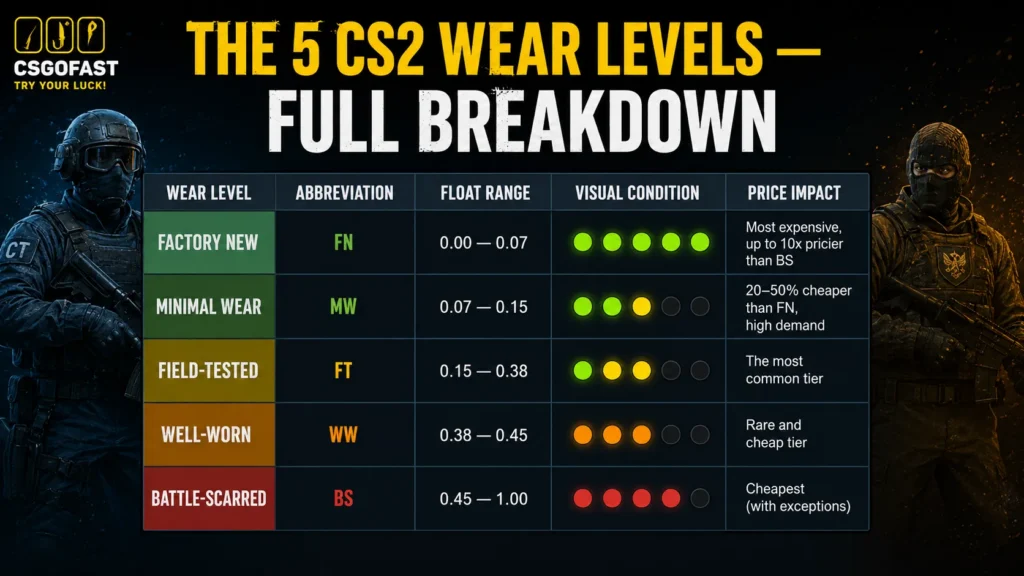
The float ranges for each wear level are hardcoded into the CS2 engine and apply to every skin. Here’s how they map to wear tiers:
| Wear Level | Abbreviation | Float Range | Visual Condition | Price Impact |
| Factory New | FN | 0.00 – 0.07 | Pristine, glossy, scratch-free | Most expensive, up to 10x pricier than BS |
| Minimal Wear | MW | 0.07 – 0.15 | Barely visible edge wear | 20-50% cheaper than FN, high demand |
| Field-Tested | FT | 0.15 – 0.38 | Noticeable wear, darkened edges | The most common tier |
| Well-Worn | WW | 0.38 – 0.45 | Clear scratches, matte surface | Rare and cheap tier |
| Battle-Scarred | BS | 0.45 – 1.00 | Heavy damage across the surface | Cheapest (with exceptions) |
Data accurate as of May 2026 — though realistically, these ranges are never going to change.
Factory New (FN) – 0.00 to 0.07
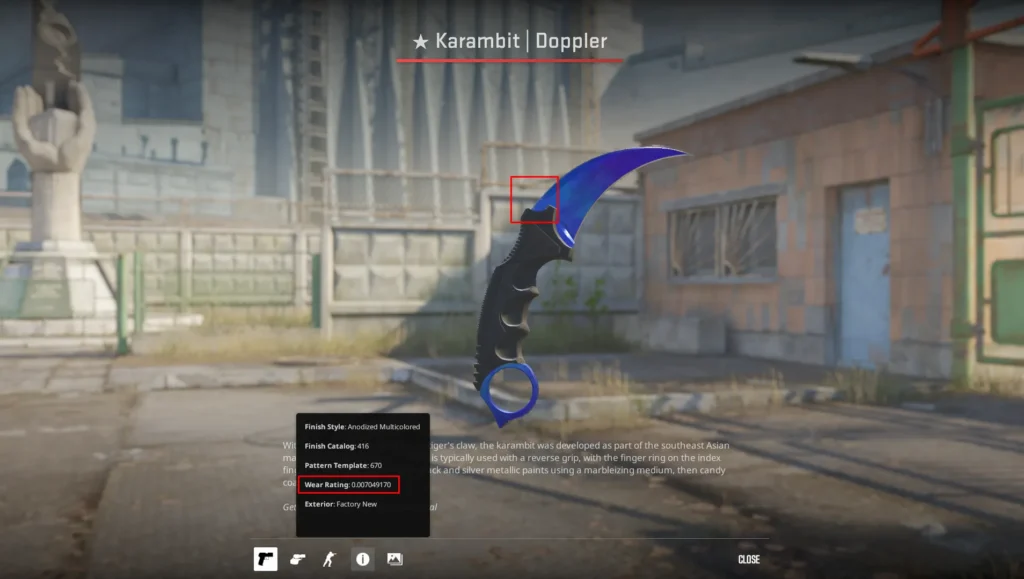
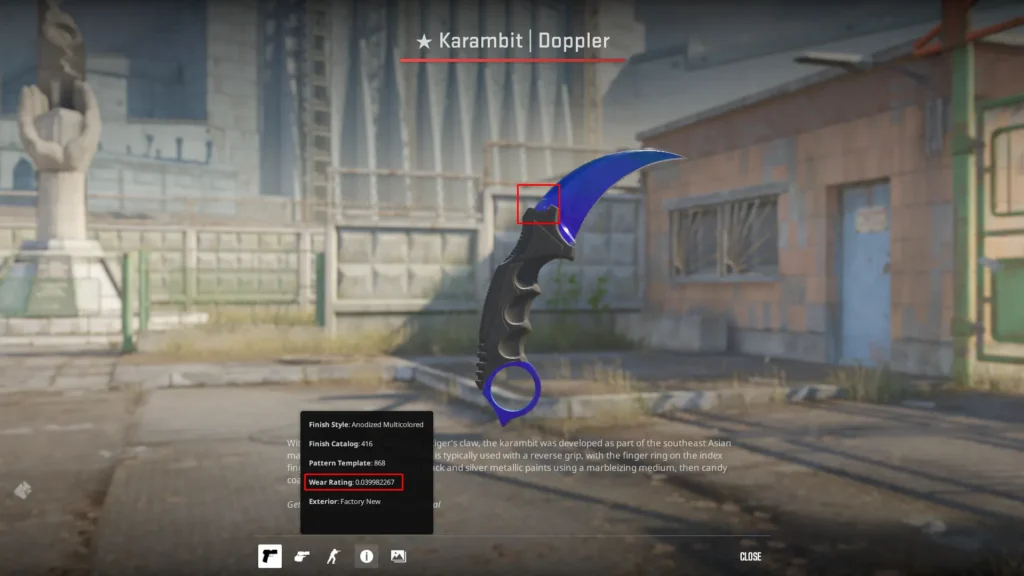
Factory New is the best wear condition: the skin looks like it just rolled off the production line. No scratches, rich colors, a clean metallic sheen.
But even within FN, the gap can be massive. A skin at float 0.001 and one at 0.069 are both “Factory New” on the label, yet they look and sell differently. This becomes very obvious on high-value skins. A quick look at listings on CSFloat tells the story: a Karambit | Doppler Sapphire at float 0.007 (the so-called “Pixel Corner”) goes for $10,000+, while the same knife at 0.03 sits around $6,000. That’s thousands of dollars riding on a couple of decimal places.
Worth noting: these kinds of premiums mostly play out on third-party markets, where price discovery is more transparent. On the Steam Marketplace, not every buyer pays attention to float – they often just grab the cheapest listing. That’s exactly why knowing your skin’s float matters: you might be sitting on a rare piece and unknowingly hand it off to someone who knows exactly what they’re looking at.
Minimal Wear (MW) – 0.07 to 0.15
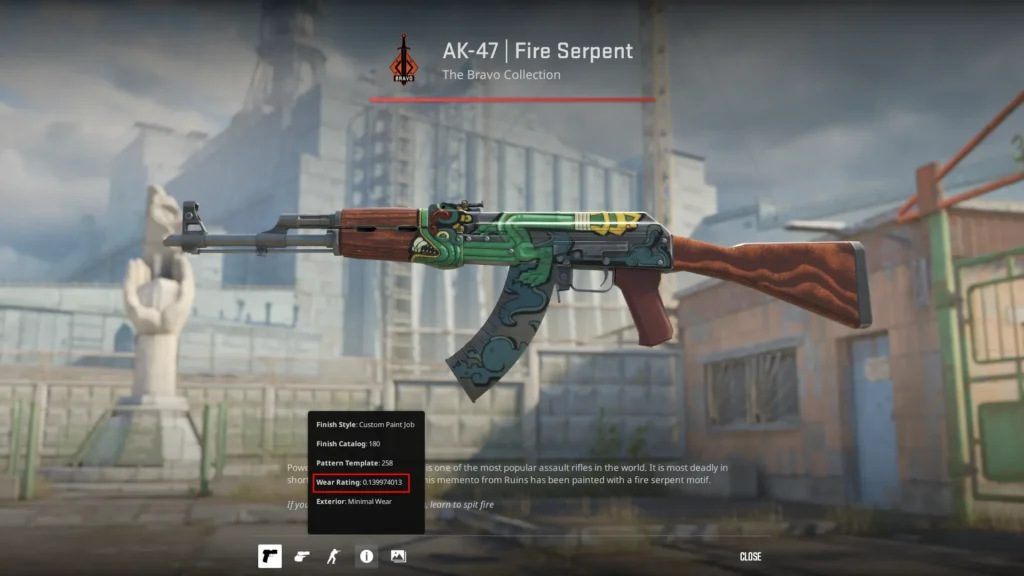
Minimal Wear is the second-best condition. There’s light edge wear, but it’s hard to notice without really looking. Most collectors consider MW the sweet spot between price and appearance.
The price gap within MW is easy to see on something like AK-47 | Fire Serpent – just compare active listings on CSGOFast or Steam Community Market: a copy at float 0.08 looks almost like Factory New and runs around $1,800, while an MW at 0.14 drops to roughly $1,400. Nearly $400 separating a 0.06 difference in float. The effect is smaller on budget skins, but the principle holds.
Also worth knowing: so-called “BSM” (Borderline Minimal Wear) skins – those right at the bottom edge of MW around 0.07-0.08 – look virtually identical to Factory New but price like Minimal Wear. Smart hunters specifically go after these.
Field-Tested (FT) – 0.15 to 0.38
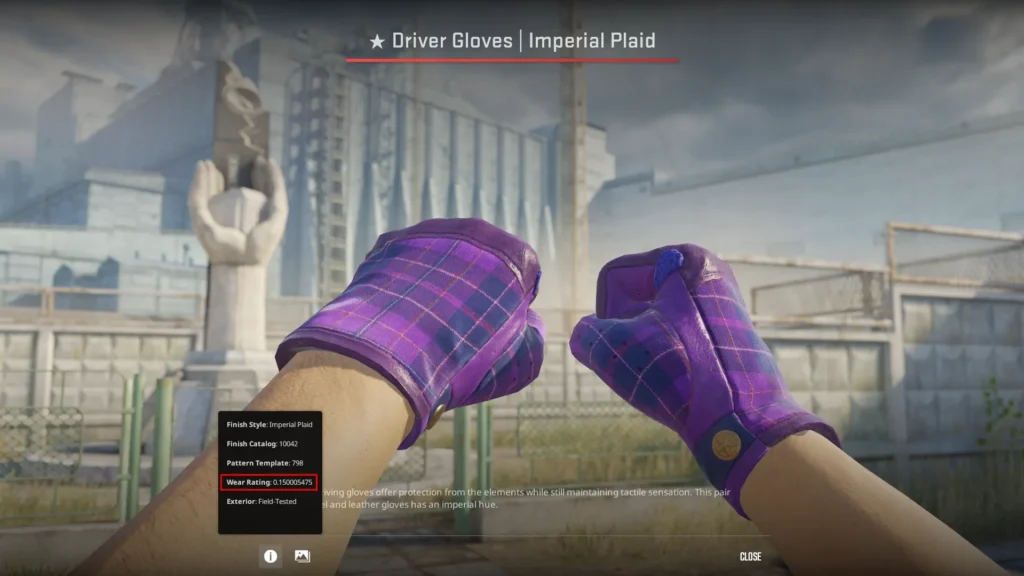
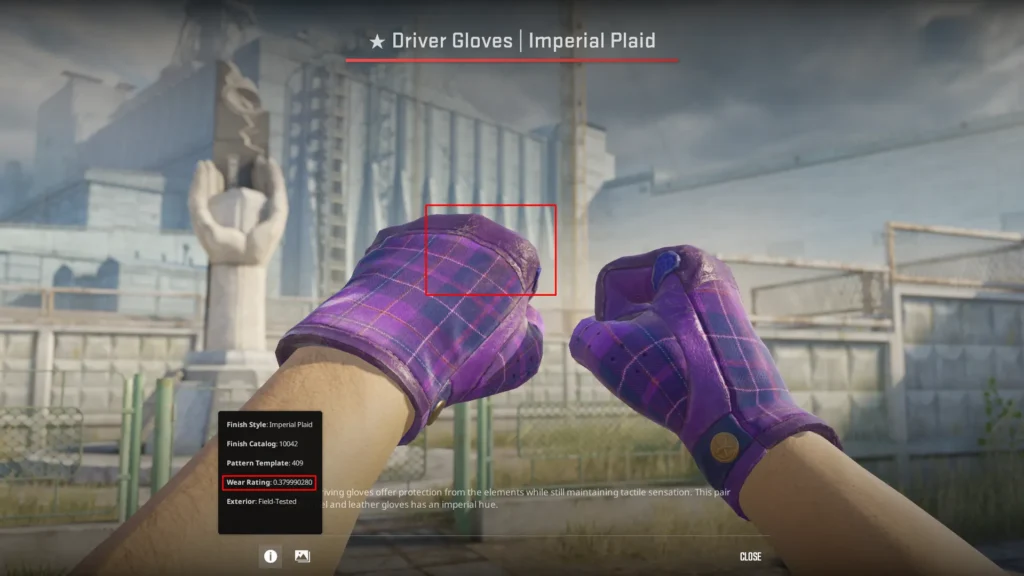
Field-Tested covers the widest range and is the most common tier on any marketplace. Scratches and darkening are visible, but the design still reads clearly. This is also where the gap between a “good” float and a “bad” float within the same tier hits hardest: FT at 0.16 looks dramatically better than FT at 0.37.
The consensus among experienced traders holds up: the 0.15–0.25 FT range offers the best value for most players – the wear is barely noticeable in-game, and the price is well below MW. This is why you should always look at the actual float number when buying FT, not just the tier label.
Well-Worn (WW) – 0.38 to 0.45
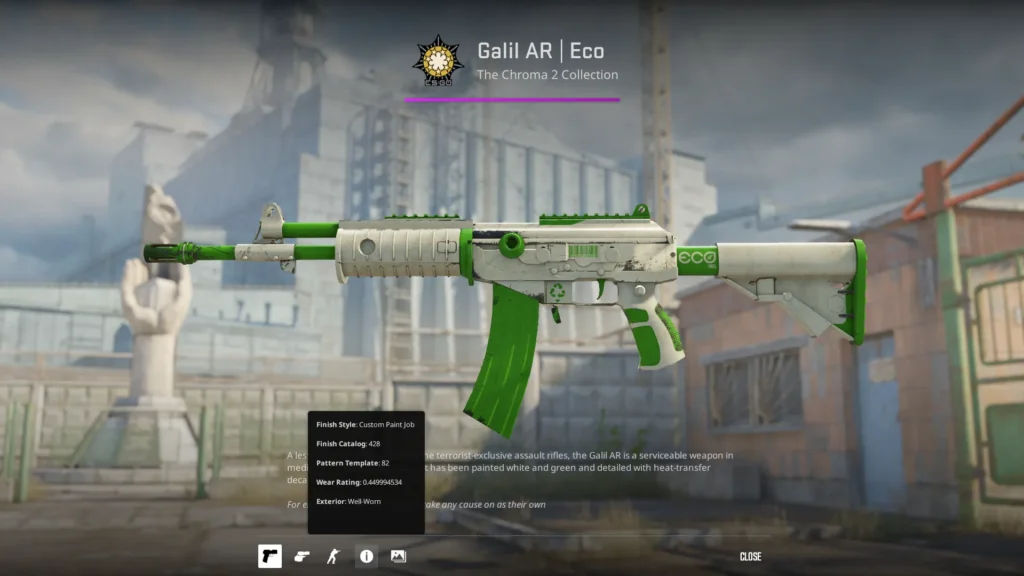
Well-Worn is a narrow band (just 0.07 wide) that most traders actively avoid. Scratches are clearly visible, colors have faded, and the metal has darkened. It’s the least-wanted tier among collectors, and the main appeal is simply the low price.
The one scenario where WW makes sense: skins with a Patina or Gunsmith finish that age gracefully – where the darkening actually enhances the look. In those cases, the visual gap between WW and BS isn’t that dramatic.
Battle-Scarred (BS) – 0.45 to 1.00
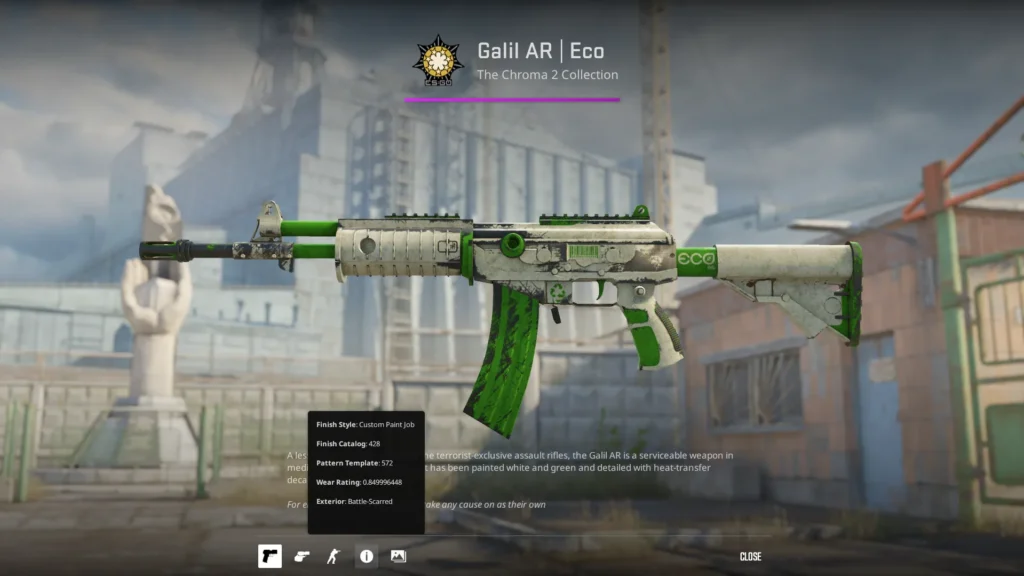
Battle-Scarred is the most worn condition. Heavy damage, faded colors, dark patches across the surface. Generally the cheapest skins on the market.
That said, there are exceptions: BS skins at extreme floats (0.95+) with rare visual effects can sell for multiples of a normal BS copy. The classic example is AWP | Asiimov above float 0.95 – the “Blackiimov” phenomenon, covered in detail below. And any Battle-Scarred with float 0.99+ is inherently a collector’s item on any popular skin.
Want to crack open a case and hunt for a skin with a perfect float? [Open cases on CSGOFast – hundreds of official CS2 cases, instant payouts, provably fair RNG.]
What Is Float Value and How Does It Work?

Float value is a decimal number between 0.00 and 1.00 that uniquely determines the visual condition of a specific skin instance. Closer to zero means fewer scratches, brighter colors, more shine. Closer to one means the skin looks increasingly beaten up.
Every skin is generated with a unique float that gets assigned at the moment the item is created – whether through opening a case, receiving a match drop, or completing a trade-up contract. Once assigned, that float never changes.
Float Caps – Range Limits
Not every skin exists across the full 0.00-1.00 range. Many have float caps – hard limits on the minimum and maximum possible float:
- AK-47 | Redline: float range 0.10-0.70 – never Factory New or Battle-Scarred
- Desert Eagle | Blaze: float range 0.00-0.08 – only exists in FN and MW
- AWP | Asiimov: float range 0.18-1.00 – no Factory New or Minimal Wear; Field-Tested is as good as it gets
- MAC-10 | Sakkaku: float range 0.21-0.79 – FT, WW, and BS only
Float caps aren’t a bug or an oversight – Valve sets them deliberately at design time, and they’re well-documented. They also directly affect the output of trade-up contracts.
How Float Gets Assigned on Unbox
When you open a case, the game generates a random number within the allowed float range for that specific skin. That number is permanently locked in. You can’t “get luckier” on the next case – every unbox is completely independent.
Do CS2 Skins Wear Out Over Time?
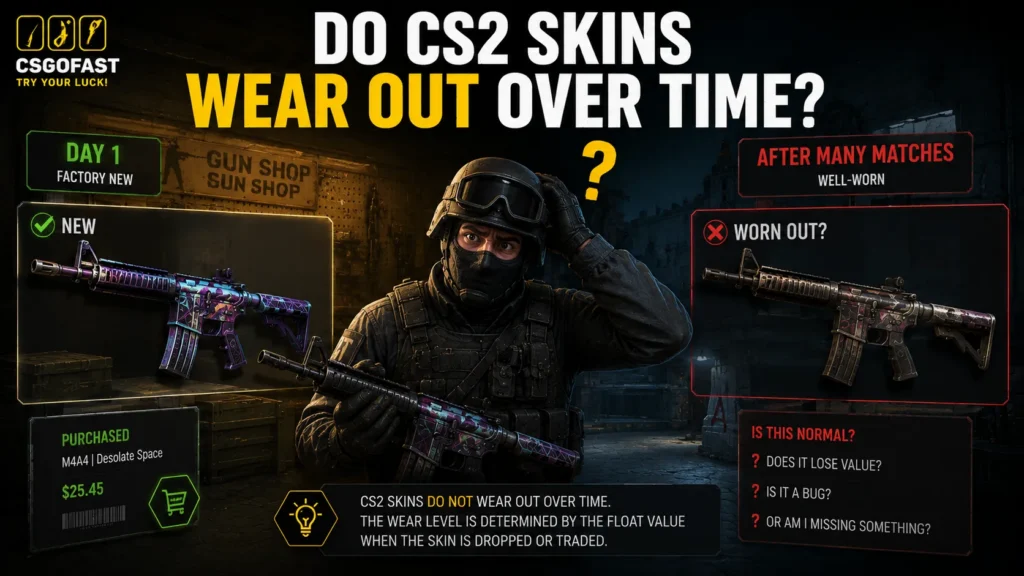
No. This is one of the most persistent myths in CS2 – and one of the most expensive misconceptions for newer players.
Float value is assigned exactly once – at the moment the item is created – and never changes afterward. Not from playing matches. Not from racking up kills. Not from applying stickers or graffiti. Not from renaming the item.
As confirmed by the official Steam Community Market rules: all skin attributes, including float, are fixed at creation and cannot be modified by gameplay or time.
If a seller claims a skin “wore down from use” or offers to “improve” a float for money – that’s either ignorance or a straight-up scam. Float cannot be changed. Period.
How Float Value Affects Skin Prices
The general rule: lower float = higher price. But that’s a significant oversimplification. In practice, how much float moves the needle depends on several factors.
The Gap Within a Single Tier
Two skins labeled “Field-Tested” – at 0.16 and 0.37 – look noticeably different, and the market prices them accordingly. Data from Pricempire supports what experienced traders already know: paying a float premium makes the most sense on Painted finishes (most knives, Whiteout, Hot Rod), where scratches are clearly visible. For Patina or Gunsmith finishes, the visual difference is usually negligible and rarely worth the premium.
Extreme Floats – A Category of Their Own
FN skins at float 0.000x (more zeros after the decimal = more valuable) and BS skins at 0.99x are considered collector pieces. They’re rare and carry a significant markup:
- Ultra-low FN: most impactful on knives and popular Covert skins. A Karambit | Doppler Sapphire at float 0.003 can run 30–50% above a standard FN copy – readily visible on open listings across major markets
- High float BS: the flagship example is AWP | Asiimov at float 0.95+, which sells for multiples of a regular BS copy thanks to the black scope effect
When Price Doesn’t Follow Float
Some skins are actually worth more at higher wear. AK-47 | Case Hardened is the classic example – certain patterns can command hundreds of thousands of dollars regardless of float, because the pattern itself is what’s rare.
Float Caps and Pricing
When a skin has a restricted float range, it simply can’t exist in all tiers. AK-47 | Redline, with a minimum float of 0.10, will never be Factory New – making Field-Tested (0.15–0.38) the best you can get. This fundamentally shapes how these skins are priced.
Looking for a skin with the perfect float?[Browse listings and open cases on CSGOFast — transparent terms, fast payouts, trusted platform.]
How to Check Float Value in CS2
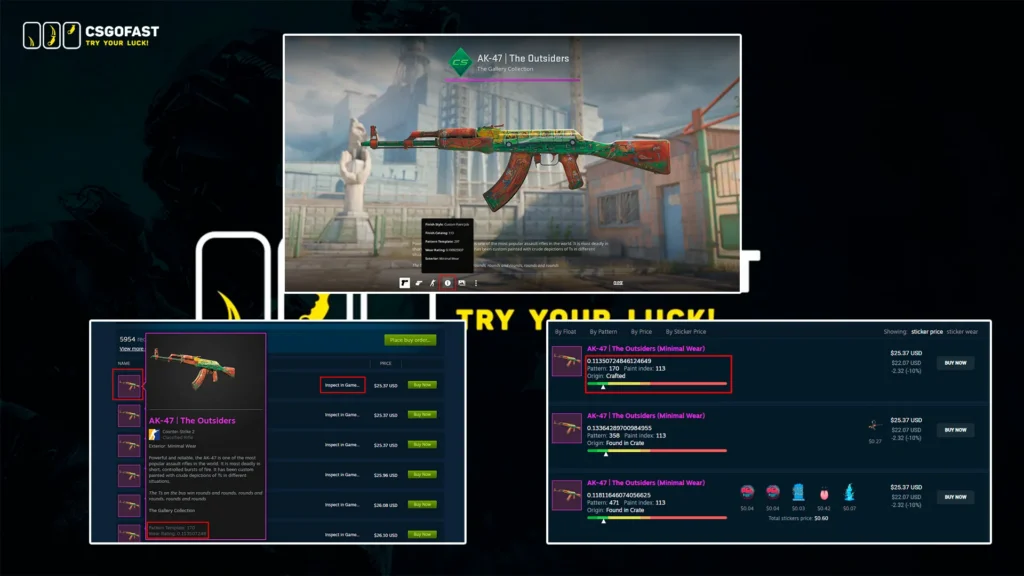
1. In-Game Inspect via Steam Inventory
The simplest method – inspect the skin directly in CS2:
- Open Inventory from the CS2 main menu
- Right-click the skin you want to check
- Select “Inspect”
- In the inspection window, click the “i” (info) icon
- Find the Float Value line
2. Steam Market and Third-Party Marketplaces
On the Steam Community Market, float is visible on hover by default. The “Inspect in Game” button on any listing lets you open the skin in CS2 and check float through the inspection menu. You can also install the SIH (Steam Inventory Helper) browser extension, which surfaces float and other useful stats directly on Steam Market pages without any extra steps.
Most major third-party marketplaces display float right on the listing card – useful when comparing options before buying.
3. Float Checkers
For serious float work, dedicated tools are the way to go:
- FloatDB – a database covering every skin in the game. Use it to find items with record-low or record-high floats, and to trace a skin’s history (how many previous owners, when it was unboxed, and more).
A practical use case: you want a skin at a specific float. Pull up FloatDB, set your parameters, and find the current owner of the right copy – along with its full provenance. For collectors and trade-up builders, this is invaluable.
Float Value in Trade-Up Contracts
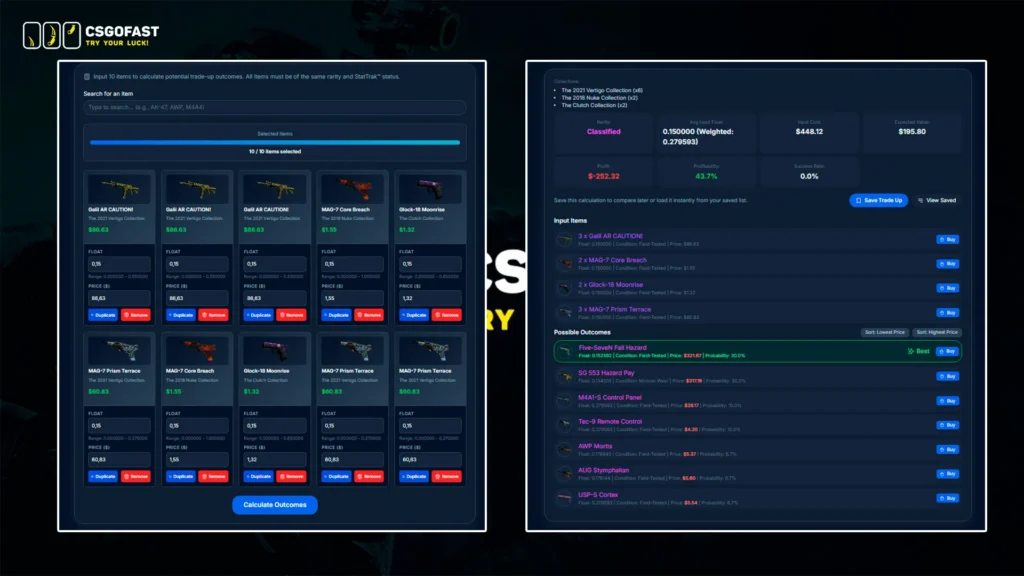
A trade-up contract is a CS2 mechanic that lets you combine 10 skins of one rarity into 1 skin of the next tier up (10 Pink → 1 Red). The key insight: the resulting skin’s float is not random – it’s calculated mathematically from the floats of all 10 input skins. That means a skilled trader can deliberately land a Factory New result where a casual player walks away with Field-Tested.
How the Formula Works – Step by Step
Honestly, most people don’t need to work through this by hand – the important takeaway is that trade-up calculators exist and do it for you. Tools like Trade Up Lab or Pricempire Trade-Up Calculator will compute the exact output float, show the probability of each possible result, and let you model the financials before committing to a contract.
For those who want to understand what’s actually happening under the hood:
Step 1 – Normalize each input skin
Different skins have different float ranges. AK-47 | Redline only exists between 0.10-0.70, while M4A1-S | Printstream spans 0.00-1.00. You can’t just average the raw floats – that would be comparing apples to oranges. So the game first converts each float into a universal 0-1 scale, where 0 is “cleanest possible for this skin” and 1 is “most worn possible”:
N = (F − Fmin) ÷ (Fmax − Fmin)
N = normalized float of the skin
F = the skin’s actual float
Fmin = the skin’s minimum possible float
Fmax = the skin’s maximum possible float
Step 2 – Average all 10 inputs
The normalized values of all 10 input skins are added together and divided by 10, giving a single number between 0 and 1.
Avg = (N₁ + N₂ + … + N₁₀) ÷ 10
Avg = the final averaged normalized value
N₁…N₁₀ = the normalized float of each of the 10 input skins
Step 3 – Map to the output skin’s range
That averaged value gets projected onto the float range of the output skin.
Result = Rmin + Avg × (Rmax − Rmin)
Result = the output skin’s final float
Avg = the averaged normalized value from Step 2
Rmin = the output skin’s minimum possible float
Rmax = the output skin’s maximum possible float
A Worked Example
Say you’re running a trade-up targeting AUG | Syd Mead from Gamma 2 Case (float range: 0.00-0.80). You want Factory New – meaning a float below 0.07.
Plug that into the formula: 0.07 = 0.00 + x × (0.80 − 0.00)
- 0.07 = the float you’re targeting
- 0.00 = output skin’s minimum float (Rmin)
- x = the average normalized value you need to find (Avg)
- 0.80 = output skin’s maximum float (Rmax)
- 0.00 = Rmin again
Solving for x gives Avg < 0.0875. That means the average normalized float of your 10 input skins needs to come in below 0.0875 to guarantee a Factory New AUG | Syd Mead.
Why This Matters in Practice
This is exactly why low-float “filler” skins for profitable trade-ups sell above market rate – traders building toward FN outputs are competing for them. If you’re just throwing in random skins without calculating floats, you’re almost certainly landing Field-Tested results where a Factory New was achievable.
Run any combination through a calculator before committing. It takes 30 seconds and can be the difference between a $30 outcome and a $200 one.
A few important rules:
- StatTrak™ skins can only be combined with other StatTrak™ skins in the same contract – mixing isn’t allowed
- Souvenir skins can’t be used in trade-ups at all
- Knife/glove trade-ups require 5 Covert skins instead of 10 – the float formula works the same way
Skins Where Float Matters Most
For most budget skins, float is barely worth thinking about. But there’s a class of skins where the gap between low and high float is a complete visual transformation – not just “cleaner vs. scruffier,” but an entirely different looking weapon.
AWP | Asiimov – and the “Blackiimov” Effect
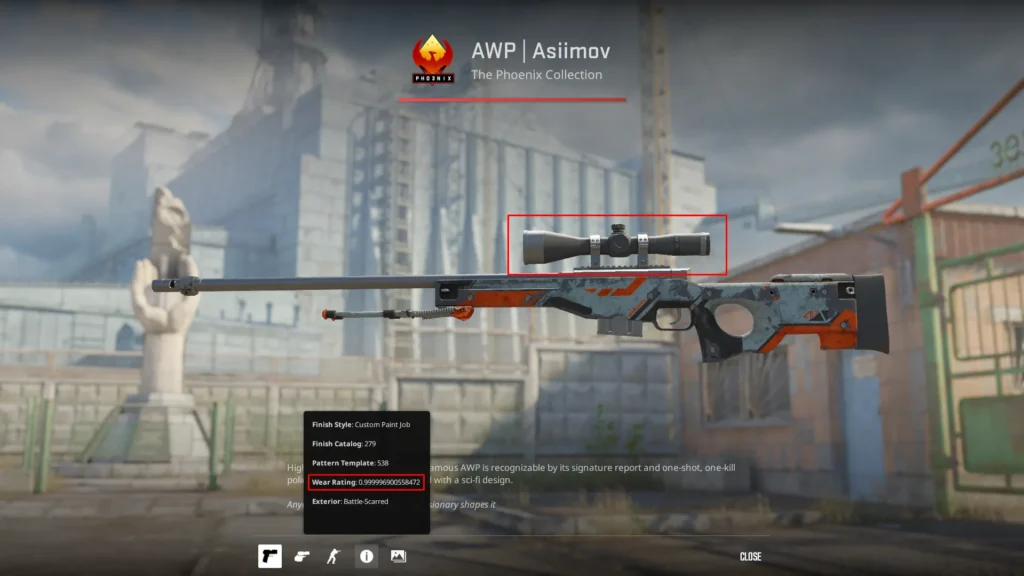
Float range: 0.18-1.00 (FN and MW unavailable)
Best FT: ~$130-140
Blackiimov BS (0.95+): ~$200-250+
AWP | Asiimov is the classic example of a high float making a skin more expensive. At float 0.95+, the scope turns completely black – an effect collectors call the “Blackiimov” or “Black Scope”.
At extreme float values, the entire surface darkens and fills with abrasion marks, transforming the iconic white Asiimov into what looks like a completely different skin. Only around 1.4% of all existing Asiimov skins carry a float above 0.95 – easy to verify by filtering listings on CSFloat – which is exactly what creates the collector premium.
One important clarification: a “fake Blackiimov” sits at float 0.90-0.94, where the scope still shows traces of white pigment. A real Blackiimov is float 0.95 and above – don’t overpay for an imitation.
M4A1-S | Night Terror – Float Across the Full Range
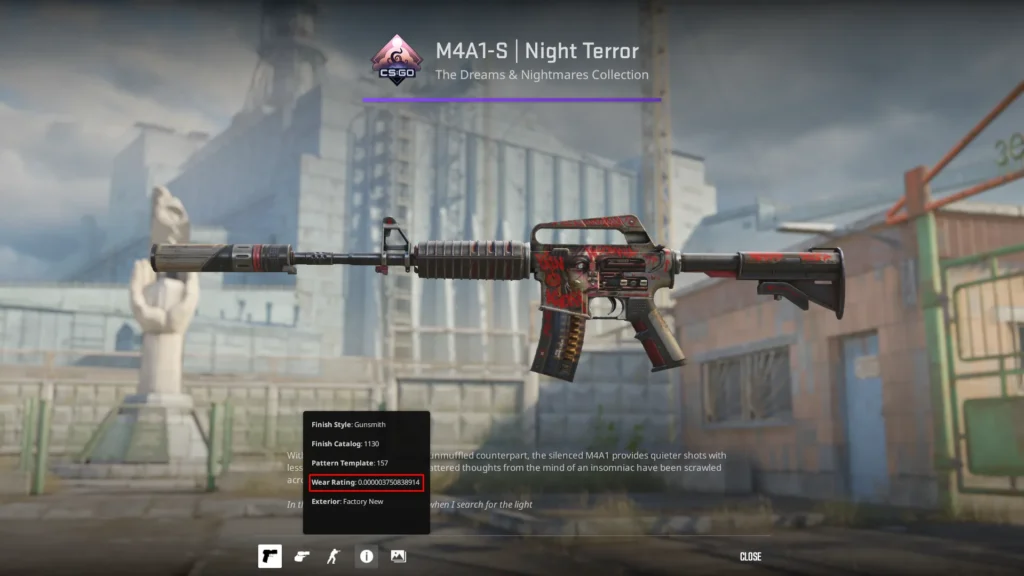
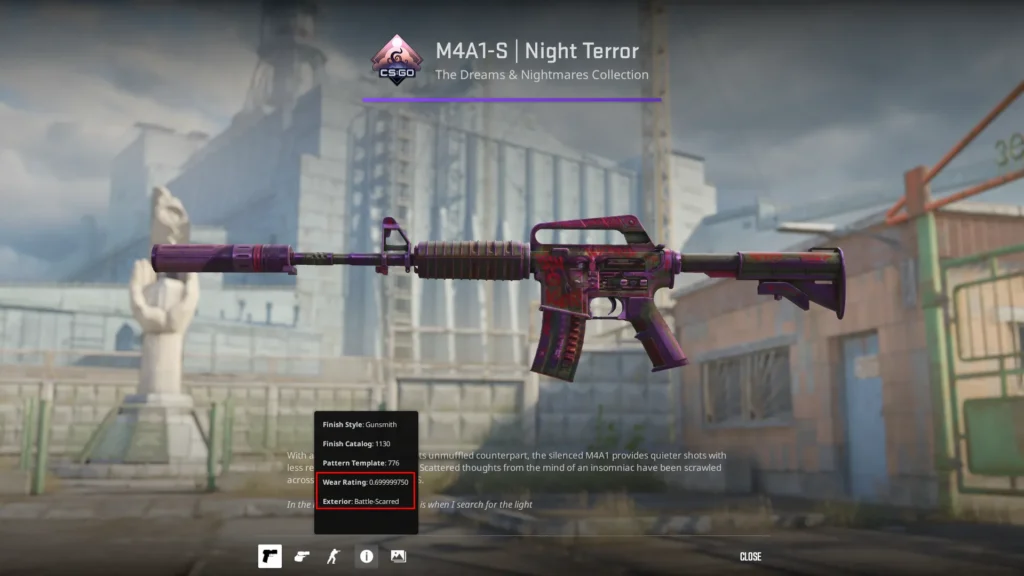
Float range: 0.00-0.7
FN price: ~$3-5
BS price: ~$1.10-1.20
M4A1-S | Night Terror is a great illustration of how float plays out across an unrestricted range. The Anodized Multicolored finish produces a bright, shimmering metallic design in Factory New condition – but as float increases toward Battle-Scarred, the skin doesn’t just get scruffier, it takes on a different character altogether. High-float BS copies develop a darker, grittier tone that some players genuinely prefer to the clean FN version.
Glock-18 | Shinobu – Japanese Style, Two Personalities
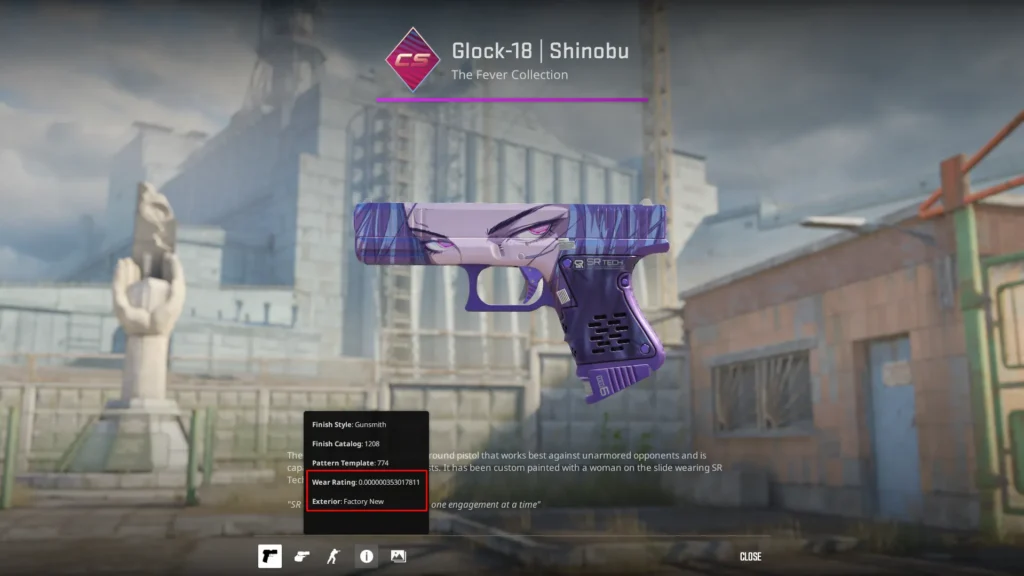
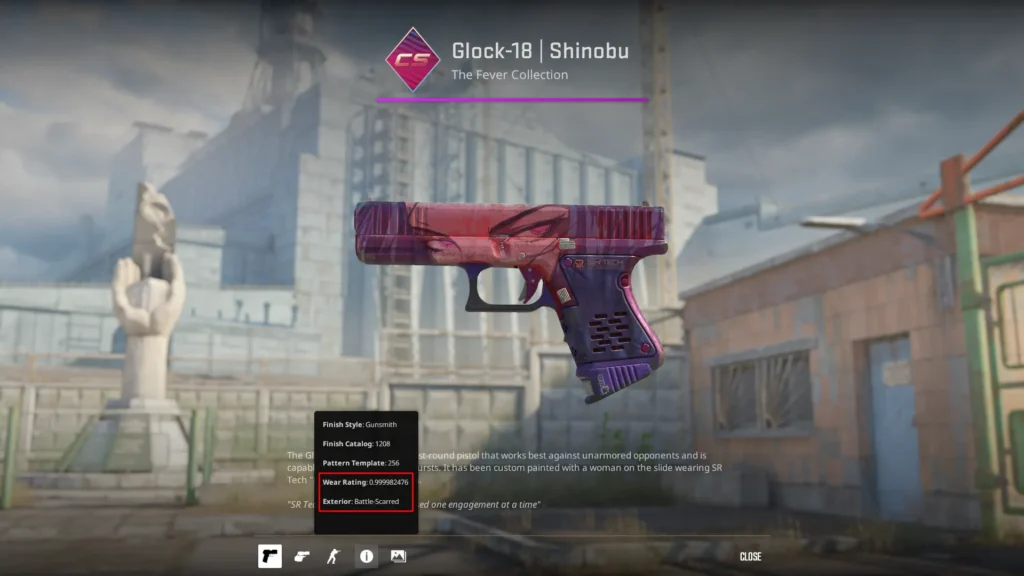
Float range: 0.00-1.00
FN price: ~$15-20
BS price: ~$5-7
Glock-18 | Shinobu from the Kilowatt Collection is one of the most visually distinct examples of float changing the whole vibe of a skin. The Japanese art style is crisp and detailed in Factory New – but it doesn’t just deteriorate in Battle-Scarred. The character’s eyes seem to fill with blood, giving the skin a noticeably darker, more menacing look. It’s not worse – it’s a different skin, with its own appeal.
USP-S | Whiteout – When “Factory New” Doesn’t Mean Spotless
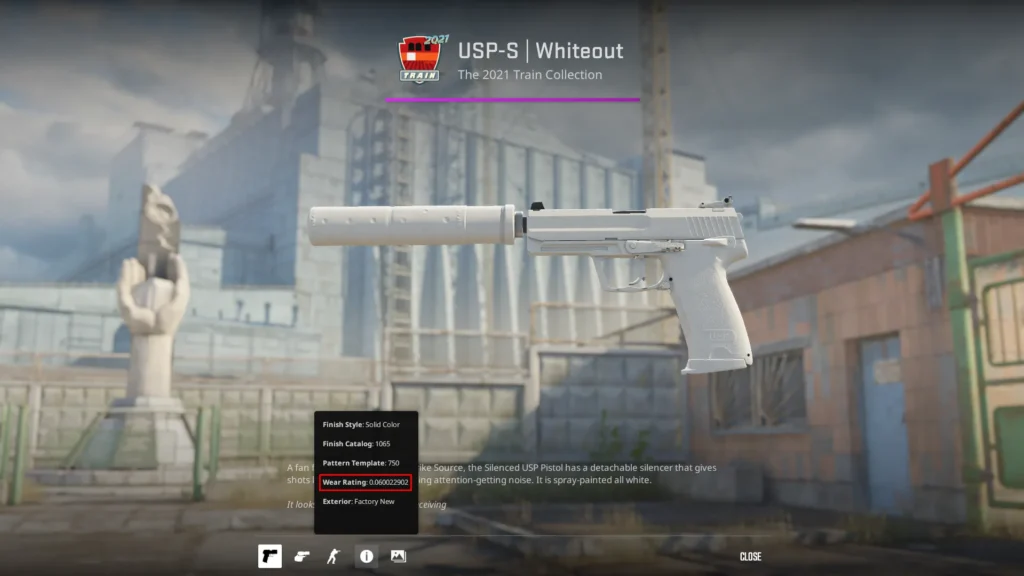
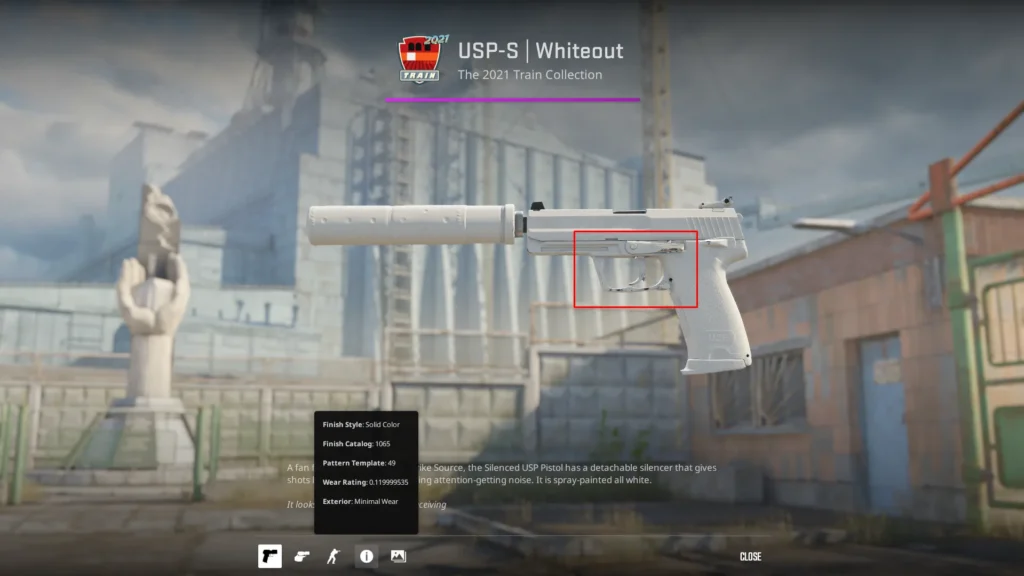
Float range: 0.06-0.80
FN price (0.06-0.07): ~$1,100-1,300
MW price: ~$210-250
USP-S | Whiteout is the most unusual entry on this list. The skin’s minimum float is 0.06 – technically within the Factory New range (0.00-0.07), but it means “Factory New Whiteout” only exists in the narrow corridor of 0.06-0.07.
The implication: even in Factory New condition, this skin already shows small scratches on the frame – because a perfectly clean float (0.001-0.05) is simply impossible for this item. With every small increase in float, visible imperfections accumulate more quickly than on most other skins, which is why finding a truly pristine Whiteout is so difficult – and why the FN-to-MW price gap is so extreme.
P90 | Death Grip – When Low Float Hides Easter Eggs
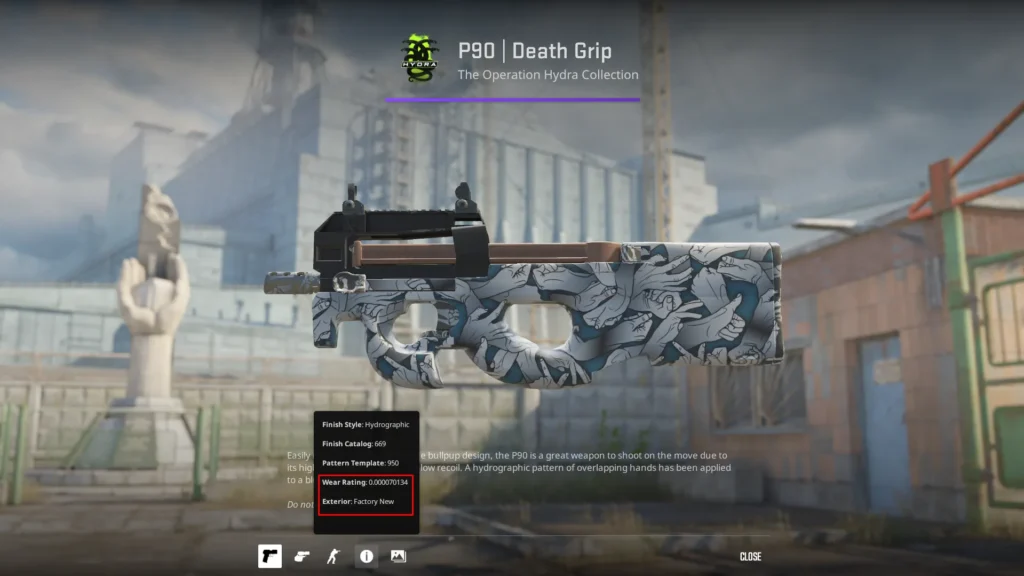
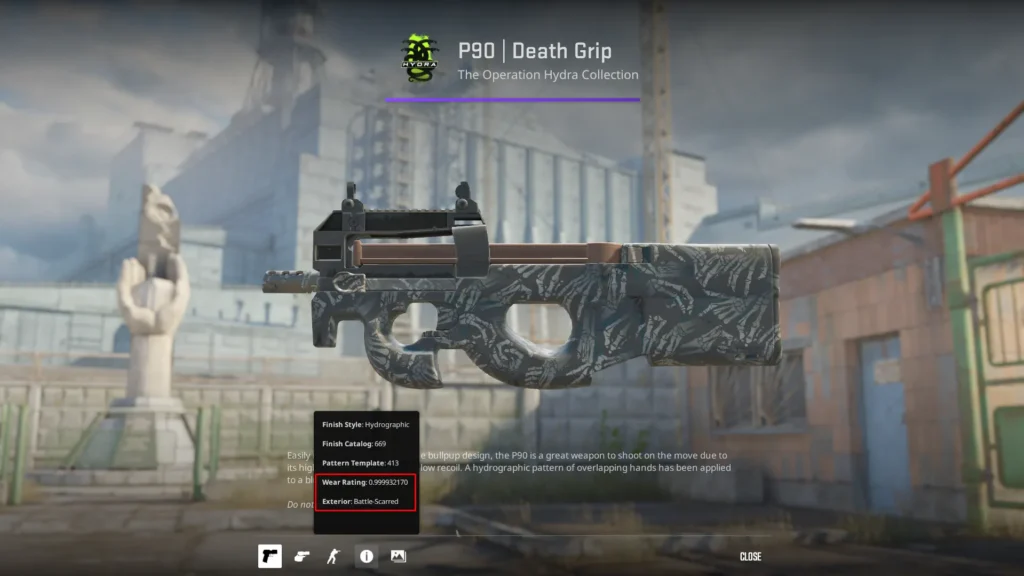
Float range: 0.00-0.10
FN price (0.00-0.07): ~$70-80
BS price: ~$30-40
P90 | Death Grip is a skin where Battle-Scarred isn’t just “more worn” – it’s a reveal. As wear increases and the surface deteriorates, a new layer of the design emerges. The fleshy hands on the Factory New version lose their skin entirely in Battle-Scarred, exposing skeletal bones underneath. It’s one of the cleanest examples of a skin that uses wear as a deliberate storytelling mechanic.
Ready to put this knowledge to use? [Open cases on CSGOFast and hunt for skins with the perfect float — or browse marketplace listings filtered by float and grab exactly what you’re after.]
FAQ
Do CS2 skins wear out from playing matches?
No. Float value is assigned once – when the item is created via case opening, match drop, or trade-up – and it never changes. You can play a million matches with a Factory New skin and it will still be Factory New with the exact same float. This is confirmed by Steam’s official documentation.
What is a good float value for a CS2 skin?
It depends on the skin and what you’re after. For most skins, the sweet spot for price-to-quality is low MW (0.07-0.10) or low FT (0.15-0.20) – the wear is barely noticeable in-game and the price is well below FN. For investing or collecting, aim for ultra-low FN (0.000x-0.001x). There’s no universal “good float” – the right answer depends on understanding how that specific skin is priced.
Can you change a skin’s float value in CS2?
No. Float value cannot be changed by any means – in-game or through any third-party service. It’s a fundamental technical attribute locked into Steam’s item infrastructure. If someone offers to “improve” your skin’s float for money, or claims they can swap it for a cleaner copy at face value – that’s a scam.
What float range is Factory New?
Factory New covers floats from 0.00 to 0.07. Keep in mind that not every skin can exist in this range – AWP | Asiimov has a minimum float of 0.18 and is never FN. Also, the difference within FN is significant: a skin at float 0.001 looks noticeably cleaner than one at 0.069 and sells for more accordingly.
Does float value affect gameplay in CS2?
Not at all. Float is a purely cosmetic attribute that affects how the skin looks. Accuracy, damage, recoil, and every other gameplay mechanic are completely unaffected by wear condition. A skin at float 0.999 performs identically to one at float 0.001.
Why does the AWP | Asiimov Blackiimov cost more than a regular Battle-Scarred?
At float 0.95+, the AWP | Asiimov scope turns completely black – the “Blackiimov” or “Black Scope” effect. These copies are extremely rare: filtering by float on CSFloat confirms that only around 1.4% of all Asiimov skins carry a float above 0.95. The combination of scarcity and a distinctive visual effect drives collector demand well above standard Battle-Scarred pricing – and at extreme floats, even above Field-Tested.
All prices in this article are based on Steam Community Market and CSFloat data as of May 2026 and are subject to change with market conditions.

I write about CS2 skin gambling , focusing on how things actually work rather than how they are marketed. Most of what I cover comes down to game mechanics, risk, and the small details that people usually overlook when getting started.